Why Verification Matters
A certificate that cannot be independently checked is just a claim with a nicer design. The point of certificate verification is to close that gap: instead of taking a company's word — or even Standard ESG's word — for it, anyone can confirm directly, from Standard ESG's own systems, that a specific certificate is real, currently valid, and was issued for the level and score being claimed. This matters most for exactly the audiences most likely to rely on a certificate at a distance: a buyer screening a supplier, an investor doing diligence, or a customer comparing options — none of whom have access to the company's internal records, and none of whom should need it.
What's Printed on a Certificate
- The company's legal name
- Industry
- Certification level (1, 2, or 3)
- The 1–10 score
- Issue date and expiry date
- A unique certificate ID
- A QR code
- The template version and content hash the assessment was scored against
A Level 3 certificate is accompanied by a separate Findings & Recommendations Report carrying the same template version and hash, so certificate and report are always traceable to identical assessment content.
Step-by-Step: Verifying a Certificate
- Scan the QR code with your phone camera or a QR reader, or, if you have the certificate ID instead, look it up directly on the verification section of standardesg.org.
- You'll land on a public verification page — no login required, because this page is intentionally public.
- Check the status field first: active, expired, or revoked.
- Compare the details — company name, level, score, issue and expiry dates — against what's printed on the physical or PDF certificate you were shown. They should match exactly. Any mismatch means you're not looking at the certificate you think you are.
- Note the level alongside the score. A score only tells you performance; the level tells you how thoroughly that performance was checked.
Reading the Verification Page
- Validity status — active, expired, or revoked; check this first.
- Score — the public 1–10 score.
- Level — 1 (Self-Assessment), 2 (Verified Documents), or 3 (On-Site Assessment).
- Company name — the certified legal entity.
- Issue date — when the certificate was issued.
- Expiry date — when it lapses (12 months from issue, unless revoked earlier).
That's the complete list. No questionnaire answers, no evidence documents, no on-site findings, and no internal review comments ever appear here.
Active, Expired, and Revoked — What Each Means
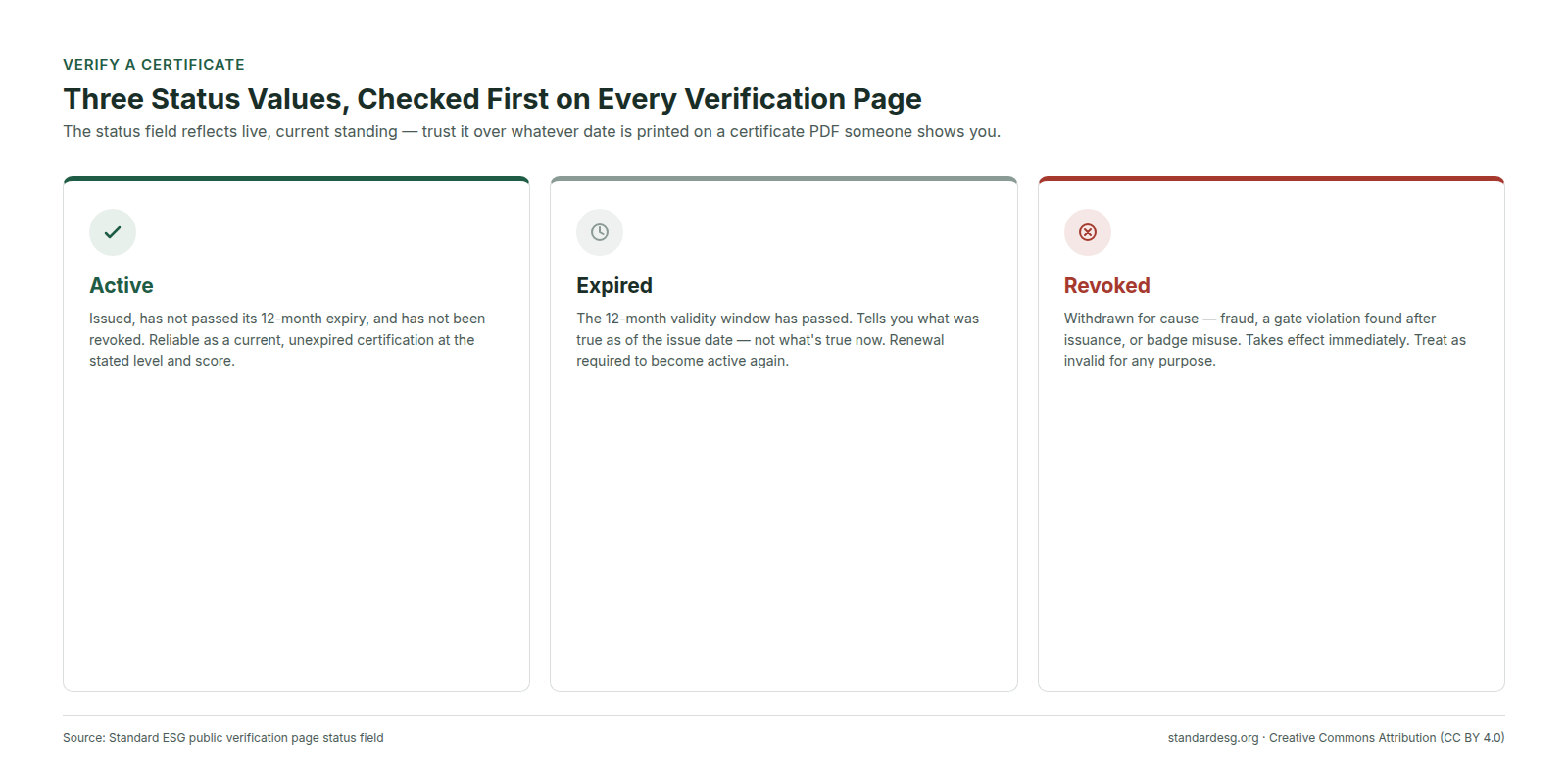
- Active — the certificate is currently valid: it was issued, has not passed its 12-month expiry, and has not been revoked. You can rely on it as a current, unexpired certification at the stated level and score.
- Expired — the 12-month validity window has passed. Expiry is automatic; the company would need to complete a renewal assessment to hold an active certificate again. An expired certificate tells you what was true as of its issue date — not what's true now.
- Revoked — Standard ESG has withdrawn the certificate for cause: fraud, a gate violation discovered after issuance (for example, evidence of child or forced labour surfacing later), or misuse of the certificate or badge. Revocation takes effect immediately and is reflected on the page right away. A revoked certificate should be treated as no longer valid for any purpose, regardless of what date is printed on the original document.
If a company shows you a certificate PDF but the verification page shows expired or revoked, trust the verification page — it reflects current status; the PDF reflects status at the moment it was generated.
What's Public, and What's Deliberately Not
Standard ESG treats all assessment data, uploaded evidence, and on-site findings as confidential to the certified company and to Standard ESG — enforced at the system level through tenant isolation and role-based access. The verification page's minimalism is the public-facing expression of that same principle: it gives you everything you need to trust the certificate's authenticity and currency, without exposing the company's confidential submission to anyone who happens to scan a QR code. If you need more detail than the verification page provides — for example, for a formal due-diligence process — that's a conversation to have directly with the certified company, who controls their own confidential assessment data.
Template Versions and Content Hashes, Explained
This is the part of verification that's easy to skip past but is actually the foundation of the whole system's trustworthiness over time.
Every industry-specific assessment template — the set of questions, weights, applicability rules, document requirements, and (for Level 3) checklist items — is versioned. Once a version is published, it is immutable: nothing about it can be changed after the fact. At the moment it locks, Standard ESG computes a SHA-256 content hash over the entire canonical template and freezes that hash alongside the version number.
That version number and hash are then stamped on every certificate and report produced from an assessment bound to that template.
- You can confirm that a certificate was scored against a specific, named set of criteria — not a vaguely-described "current methodology" that might mean different things at different times.
- If Standard ESG later strengthens or changes its criteria (which happens as the protocol matures), a certificate issued under an earlier template still shows, transparently, which earlier version it was scored against — it doesn't get silently reinterpreted as having met today's bar.
- Because the hash is computed over the entire template content, any change to even a single indicator's weight or wording would produce a different hash — making the template's content, at that version, essentially tamper-evident.
You don't need to manually verify a SHA-256 hash yourself to benefit from this; the point is that the mechanism exists and makes the underlying claim checkable, in principle, by anyone with the technical means to do so — the same property that gives cryptographic signatures their trustworthiness generally.
Verifying a Level 3 Findings & Recommendations Report
If you've been given a Level 3 Findings & Recommendations Report alongside a certificate, confirm that the template version and checksum printed on the report match the ones printed on the certificate. They should be identical — both were produced from the same assessment, scored against the same locked template. A mismatch would indicate the report and certificate do not actually belong together, which is exactly the kind of inconsistency this design is meant to make detectable.
Red Flags to Watch For
- A certificate ID that doesn't return a result on the verification page at all.
- Verification page status doesn't match what's claimed to you verbally or in marketing material.
- A company describing its certification as an "ISO certification." It isn't — Standard ESG's protocol is ISO 20400-compatible and informed by several ISO and other standards, but it does not claim ISO conformity assessment.
- A badge displayed with no accompanying certificate ID or QR code you can actually check.
- Claims that certification extends to a company's suppliers or subsidiaries who haven't independently registered and certified — Standard ESG does not certify suppliers through another company's certificate.
Frequently Asked Questions
Standard ESG (standardesg.org) makes every certificate publicly, independently verifiable by design. For the full methodology behind what's being verified, see The Standard ESG Certification Protocol: A Public Overview and How the Standard ESG 1–10 Score Works.
Was this page useful?